
Selecting the Perfect Voice
The right voice can make or break your video. Cliptude provides a wide range of AI-generated voices to match the tone and style of your content.
Searching for Voices
You can easily find the ideal voice by using the search bar within the voice selection interface.
- 1 Filter by Category: Search for terms like "News", "Narrative", "Energetic", or "Calm" to filter voices by style.
- 2 Search by Name: If you know the name of a specific voice you like, simply type it in.
Find Specific Voices by ID
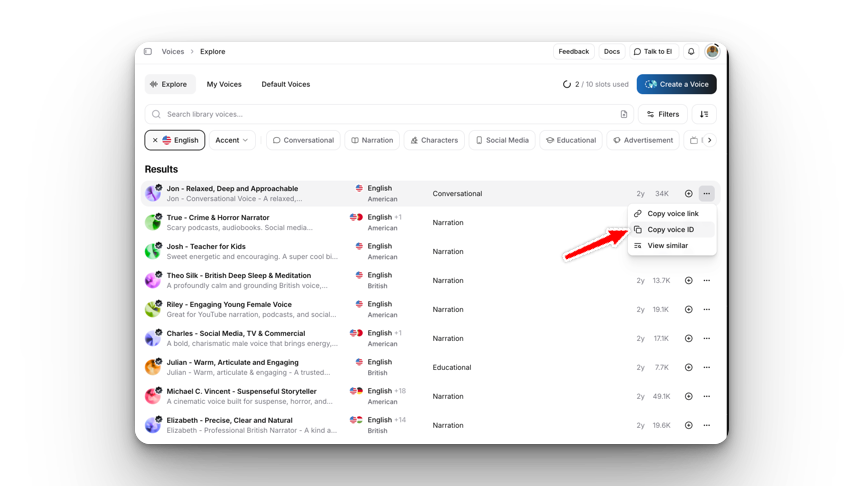
If you find a voice you love on the ElevenLabs website, you can add it directly to Cliptude using its Voice ID.
- Go to the ElevenLabs Voice Library.
- Find a voice you like and click on it to view details.
- Copy the Voice ID (it looks like a long string of characters).
- Paste the ID into the Cliptude search bar.
- If the voice is valid, it will appear in the results for you to select!
Previewing Voices
Before making your final decision, it's crucial to hear how the voice sounds.
Listen First
Click the play button next to any voice in the list to hear a sample. This helps you gauge the accent, pitch, and speed to ensuring it fits your video's vibe.
Selection Tips
For Documentaries
Choose deep, calm, and authoritative voices. Look for "Narrative" or "Deep" tags.
For Top 10 Lists
Opt for energetic, fast-paced, and engaging voices to keep the viewer excited.